Cost of QuickBooks Training Near Me: Courses and Options

QuickBooks courses can often be completed in a few days or less, though building confidence with your regular workflows may take longer. The cost of QuickBooks training near me depends on the format, instructor support, and topics covered.
Compare more than the advertised price: self-paced courses, live online classes, in-person sessions, and private lessons offer different balances of flexibility and guidance. The right fit depends on what you need to learn and how you prefer to practice.
This guide explains what affects training costs, how long learning may take, and how online, in-person, private, and group options compare. You’ll also learn how QuickBooks Online training can help you build skills around your business’s bookkeeping needs.
Table of Contents
How Much Do QuickBooks Training Courses Cost?
Course costs depend on the teaching format, course level, instructor support, and included materials.
Instructor-Led Course Pricing
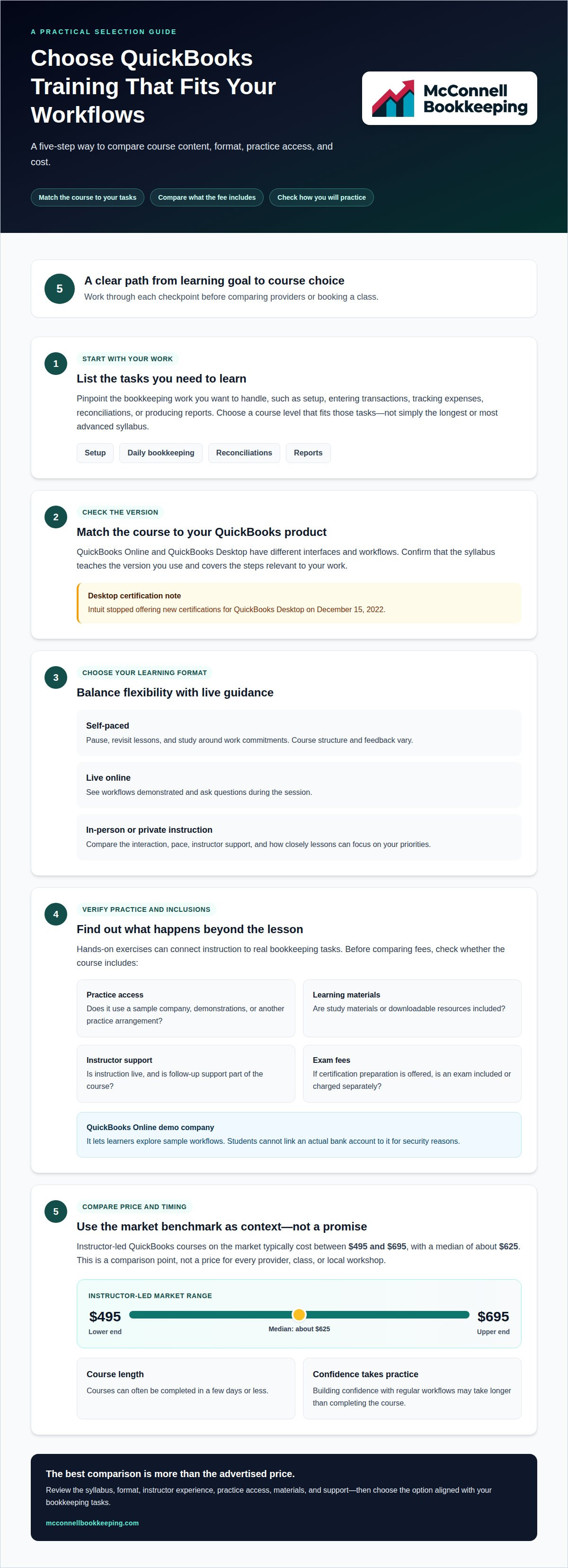
Instructor-led QuickBooks courses on the market typically cost between $495 and $695, with a median of about $625. That market range offers a useful benchmark for both QuickBooks Online and Desktop classes, but course content and delivery can differ. Certification courses may cover exam preparation, while practical classes focus on tasks such as setup, transactions, and reports. Compare the skills taught, not price alone.
Comparing Course Prices and Providers
Compare each course’s syllabus, format, instructor experience, and included support. A lower-cost option may cover basic navigation, while a focused class may teach reconciliations, reporting, or workflows relevant to your work. Before booking, ask which topics the fee covers, whether instruction is live, and whether materials or follow-up support are included. Employer reimbursement depends on workplace education policies. Tax treatment depends on your circumstances and applicable rules; the course cost alone doesn’t establish eligibility.
Included Training Materials and Software
Course fees may include study materials and exam fees, particularly for certification preparation. Other programs charge for instruction alone, so compare the listed inclusions. Software access also affects how you practice: courses may use demonstrations or a sample company rather than your own books. Ask whether practice access, downloadable materials, and an exam are included or cost extra.
Local Classes and Lower-Cost Options
Local in-person classes and workshops vary by length, group format, and instructor support. The broader instructor-led market range can provide a comparison point, but it doesn’t determine the price of every local workshop. Free or lower-cost learning may suit someone seeking an introduction, while paid courses can offer a structured syllabus and instructor guidance. Self-study and on-demand courses also vary in the feedback they provide.
QuickBooks courses range from beginner lessons to advanced topics and certification preparation, with costs varying by level. Topics may include setup, daily bookkeeping, reporting, and exam skills. Choose a level that matches the tasks you need to perform; advanced material may add little if you’re still learning basic workflows. Certification courses may include study materials or exam fees, but inclusions vary.
Online, in-person, and self-paced training options
The format affects how instruction fits your schedule and how you practice accounting tasks. Compare the course structure, access, and feedback before choosing.
Live Online and In-Person Formats
Live online classes let instructors demonstrate workflows and answer questions during the session. In-person classes offer direct interaction in a classroom or workshop. For either format, compare the syllabus and prerequisites with your learning goals. A course focused on daily bookkeeping may suit a new user, while advanced lessons can address more complex tasks.
Look for hands-on exercises and interactive instruction, not just a list of topics. A useful session might demonstrate how to enter transactions, then let learners practice with guidance. QuickBooks ProAdvisors can provide courses to their QuickBooks Online clients, connecting instruction to those clients’ bookkeeping needs.
Self-paced courses suit learners who want to pause, revisit lessons, or study around work commitments. Their structure varies: some include recorded demonstrations and exercises, while others provide materials without live feedback. Check how lessons are organized and whether the syllabus covers the tasks you need, such as setting up accounts or reviewing reports. This helps distinguish practical instruction from a broad software overview.
Software access is another detail to compare. Course fees may or may not include practice access, so find out whether the class uses a sample company or requires another arrangement. QuickBooks Online’s demo company lets learners explore sample workflows, but students cannot link an actual bank account to it for security reasons. It offers a way to practice without connecting live banking information.
Desktop and Online Course Choices
Choose training for the version you use. QuickBooks Online and QuickBooks Desktop have different interfaces and workflows, so a course designed for one may not teach the steps you need in the other. Match the course syllabus to your actual tasks, such as entering sales, tracking expenses, or producing reports. Intuit stopped offering new certifications for QuickBooks Desktop on December 15, 2022.
QuickBooks Online courses may cover basic setup, daily bookkeeping, and advanced features, including QuickBooks Payments. Decide whether you need a guided introduction or instruction on a specific workflow. A clear syllabus shows whether the course builds relevant skills or focuses on features outside your accounting responsibilities.
Before enrolling, compare prerequisites, practice format, instructor interaction, and software access. Someone learning transaction entry, for example, may benefit from guided exercises, while a learner who already handles routine bookkeeping may prefer advanced reporting lessons. These details help you decide whether online, in-person, or self-paced instruction fits your goals.
Private and group training
Private and group programs differ in instructor attention, pace, and how closely lessons match your bookkeeping tasks. The hourly rate for a QuickBooks tutor in your area depends on the instructor’s experience, lesson format, and topics. A quote based on those details is more useful than assuming one rate applies to everyone.
Private instruction lets the instructor focus on one learner’s questions and priorities. A business owner who needs help understanding transaction categories, for example, can use the lesson to focus on that workflow. Someone preparing for certification may instead want structured exam review. A specific goal makes it easier to tailor sessions to relevant skills.
Group classes take several learners through shared material with one instructor. This can suit employees who need consistent procedures, such as recording sales or reviewing reports. Participants can also learn from other learners’ questions and scenarios. However, a shared plan may leave less time for an individual’s bookkeeping setup or questions.
Compare how each format charges before choosing. Private programs may charge by session, hour, or course, while group programs may charge per participant or course. Ask what the fee covers, how much instructor interaction is included, and whether the program includes practice activities. These details help explain why two similarly named courses may differ in cost.
Let your learning goals guide the format. Beginners may need steady instruction on navigating QuickBooks and understanding basic bookkeeping terms. Someone who already handles routine entries may benefit more from focused lessons on reporting or account reconciliation. Define the tasks you want to understand, then compare each program’s syllabus with those needs.
Certification preparation has a specific learning goal. A structured program can cover course materials, exam format, and practice exams, while a study group can offer peer discussion. Neither format suits every candidate. Consider whether you need an instructor to explain difficult topics or prefer a shared schedule to keep exam preparation on track.
Before booking, clarify the practical details that affect learning: session length, class size, software version, and access to practice materials. QuickBooks Online users need instruction aligned with that version, while Desktop users need relevant Desktop workflows. A mismatch can leave learners practicing skills they won’t use.
Use these criteria to make the choice:
Choose private lessons for focused questions or a learning plan built around specific bookkeeping tasks.
Choose group training for shared instruction, peer discussion, or consistent workflows across a team.
Compare programs by syllabus, instructor access, practice activities, and the price’s billing basis.
A clear goal makes the decision more practical. Identify the QuickBooks skills you need, then choose the format that offers enough guidance and practice.
Rates vary by instructor experience, lesson format, and topics covered. Ask for a quote based on your learning goals and whether the instruction is private or in a group.
Programs may charge by the hour, session, course, or participant. Ask what the fee includes, including instructor interaction and practice activities, then compare quotes for your needs.
Guided hands-on practice
Guided practice turns an Intuit QuickBooks demonstration into coached work on accounting tasks. An instructor can show a sample transaction, explain each decision, then watch a learner repeat the workflow. A purchase entry, for example, can show how transaction details affect expense records. The instructor can correct misunderstandings as they arise, rather than leaving learners to interpret written directions alone.
Useful exercises reflect the work learners expect to do. An instructor might demonstrate recording a purchase, entering a customer payment, or reviewing a report. Learners then complete similar examples in the training environment as the instructor explains common decision points. This connects software controls with bookkeeping concepts, helping learners understand where information goes and why accurate entry matters.
Practice works best when examples progress from familiar tasks to more involved workflows. A session might start with transaction entry, then move to classifying expenses and reviewing account activity. The instructor can pause after each exercise, ask the learner to explain the result, and revisit unclear steps. This feedback helps identify gaps before learners apply new skills to business work.
The training environment also shapes the practice experience. A sample company demonstrates workflows without exposing real business records, while prepared exercises keep instruction focused. If a course uses a learner’s company file, the instructor can explain how practice relates to that setup. Find out whether examples are demonstrations, simulated exercises, or work in an actual accounting file.
Before enrolling, ask how guided practice fits into the course. Find out which tasks learners perform, whether the instructor reviews their work, and what software access is required. A course based mainly on watching demonstrations may offer less feedback than one with observed exercises. These details help you judge whether the program teaches usable skills or mainly explains interface features.
Focused practice can reveal questions that a lecture may not. A learner might understand how to enter a purchase but remain unsure how it appears in reports. The instructor can explain the bookkeeping effect and show where to review the result, making it easier to connect individual entries with financial information.
For advanced learning, instructors can use multi-step scenarios that combine routine tasks. A sample business might record purchases, track customer payments, and review the resulting account activity. Learners practice the sequence as the instructor checks their decisions and explains corrections. These exercises help learners prepare for recurring workflows without treating a single demonstration as complete training.
Before a course begins, identify the tasks that matter most, such as entering purchases or reviewing reports. This helps the instructor choose relevant exercises and spend less time on unrelated features. A clear practice plan also gives learners a concrete way to assess whether the training meets their needs.
Live QuickBooks classes
Live classes combine scheduled instruction with opportunities to ask questions as lessons unfold. Their value depends on how well the curriculum matches your bookkeeping responsibilities and whether learners can practice during class.
Courses for QuickBooks Online clients can cover basic setup, daily bookkeeping, and advanced features such as QuickBooks Payments. Learners can build from essential workflows toward tools they may use in regular operations. A business owner focused on daily entries may need a different class from someone learning about payment features or reporting.
Live instruction lets learners pause a demonstration and clarify a confusing step. An instructor can show how a bookkeeping task works, then answer questions about the workflow. QuickBooks ProAdvisors can provide training courses to their QuickBooks Online clients, helping them build basic bookkeeping knowledge and make conversations with ProAdvisors more productive and focused on challenging tasks.
Course quality depends on more than having an instructor present. Before selecting a class, assess its hands-on training, interactive components, instructor experience, and fit with your career or business needs. A session that invites questions and includes practice may be more useful than one that only presents software features. The syllabus shows what learners will actually cover.
Match the class level to your responsibilities. Someone new to bookkeeping may benefit from instruction on setup and routine entries, while an experienced user may need lessons on advanced features. If the course covers QuickBooks Payments, make sure the topic supports a task you expect to handle. A focused syllabus keeps class time relevant.
Live classes give learners a shared structure. A team learning the same bookkeeping workflows can discuss common procedures, while individual participants can ask questions about their own work. The format works best when the instructor explains concepts clearly and encourages interaction, rather than moving through slides without learner participation.
Use these criteria to assess a course before enrolling:
Check the syllabus: Look for specific topics, such as setup, daily bookkeeping, or QuickBooks Payments.
Review the learning format: Identify whether the class includes hands-on exercises and interaction.
Assess the instructor: Consider relevant experience and the ability to explain practical workflows.
Match the content to your needs: Choose lessons that fit your business tasks or career goals.
A live class is a stronger fit when its teaching approach, instructor, and topics align with the work learners need to do. These factors distinguish practical instruction from a general software overview.
McConnell Bookkeeping: QuickBooks Online Training
McConnell Bookkeeping provides QuickBooks Online Training for business owners who want clearer, more confident bookkeeping workflows. Training can help you understand how to use QuickBooks Online for your day-to-day accounting needs.
If your records need attention before training can be most useful, Books Cleanup can help organize them. Monthly Bank Reconciliations and Financial Statement Preparation can also support clearer, more reliable financial records alongside your learning.
Consider professional QuickBooks Online guidance if you want to strengthen your skills or organize your books alongside training. Contact McConnell Bookkeeping to discuss your bookkeeping needs.
Build a Clearer Path Forward
Connect QuickBooks learning with the financial routines you want to manage confidently. As you assess the cost of QuickBooks training near me, consider which bookkeeping tasks you want to handle more clearly and where professional support could help. A focused learning goal makes it easier to apply new knowledge to your business records.
McConnell Bookkeeping offers QuickBooks Online Training, along with Books Cleanup, Monthly Bank Reconciliations, and Financial Statement Preparation. These services can support organized records and clearer financial information as you strengthen your bookkeeping processes.
Share what you want to improve, whether that’s using QuickBooks Online more effectively or getting your books in order. Contact McConnell Bookkeeping to discuss a practical next step for your business. With the right guidance, you can move forward with greater clarity and confidence.
Frequently Asked Questions
How long does it take to learn QuickBooks?
Basic QuickBooks courses can often be completed in a few days or less, but applying the skills confidently takes practice. The time depends on your starting point and the tasks you need to handle. Someone learning routine transaction entry may progress faster than a learner tackling reporting or complex bookkeeping workflows. Set a practical learning goal, such as understanding how to review a monthly report, to focus your training.
Ready to Master QuickBooks?
Start by identifying the bookkeeping work you want to manage with greater confidence. You may want to understand how to enter transactions, organize records, or interpret reports. McConnell Bookkeeping offers QuickBooks Online Training for business owners who want professional guidance with the software. If you’re in Mesa or the Phoenix business community, training can be a practical next step toward stronger day-to-day QuickBooks skills.
How much does QuickBooks training cost near me?
The cost of QuickBooks training near you depends on the course format, level, instructor support, and included materials. Instructor-led QuickBooks courses on the market typically range from $495 to $695, with a median of about $625. Treat these figures as market comparisons, not a quote for a specific course or provider.
What do online QuickBooks courses cost compared with local training?
Online course costs vary depending on whether lessons are self-paced or instructor-led, while local class prices depend on format and instruction. The broader instructor-led market range can provide a comparison point, but it doesn’t determine the price of every online or local course. Compare the syllabus, practice activities, and instructor access alongside the fee. A lower price may mean less individual feedback or fewer included materials.
How can I compare local QuickBooks trainers, reviews, and credentials?
Compare trainers by matching their course topics and experience to the QuickBooks tasks you need to learn. Look for clear syllabi, relevant hands-on exercises, and interactive instruction. Reviews can offer insight into learners’ experiences, but focus on comments about teaching clarity and practical support, not star ratings alone. In Mesa, Phoenix, Gilbert, Tempe, Chandler, and Scottsdale, these criteria help you assess whether a local option fits your goals.



Comments